If you are already dealing with broken or missing Joomla URLs, you may also want to read our guide on how to fix 404 errors in Joomla.
What Are SEF URLs in Joomla?
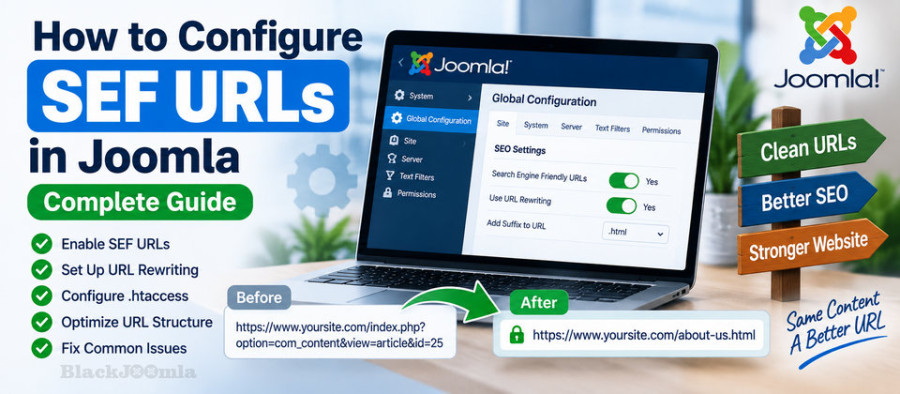
SEF stands for Search Engine Friendly. SEF URLs are human-readable URLs that describe the content or structure of a page instead of exposing technical query parameters.
For example, a traditional Joomla URL may look similar to:
https://example.com/index.php?option=com_content&view=article&id=25
With SEF URLs enabled, the same type of page can use a much cleaner structure such as:
https://example.com/about-us
The exact URL depends on your Joomla menu structure, article aliases, categories, and SEF configuration.
Joomla's routing system generates and processes these human-readable URLs. SEF URLs can work without removing index.php , while URL rewriting is what allows the index.php portion to be removed from the visible URL.
Why Should You Use SEF URLs?
SEF URLs can provide several practical benefits:
- They are easier for visitors to understand.
- They make links easier to share and remember.
- They provide useful context about the destination page.
- They create a cleaner website URL structure.
- They make website navigation and content organization easier to understand.
- They are an important part of a properly configured Joomla SEO setup.
SEF URLs are not a magic ranking factor by themselves. Good URLs should be considered as one part of a broader SEO strategy that also includes useful content, internal linking, metadata, performance, structured data, and technical SEO.
For a broader overview of Joomla SEO extensions and tools, see our guide to the best Joomla SEO extensions.
Joomla SEF URL Settings Explained
Joomla provides several URL-related options in Global Configuration. The most important settings are:
- Search Engine Friendly URLs
- Use URL Rewriting
- Add Suffix to URL
These settings affect the way Joomla generates URLs and should be configured carefully, especially on an existing website with indexed pages.
1. Search Engine Friendly URLs
The Search Engine Friendly URLs option converts Joomla's native URLs into cleaner, human-readable routes.
For example, instead of a URL containing parameters such as option , view , and id , Joomla can generate a route based on your menu structure and aliases.
This is the first setting you should enable when configuring Joomla SEF URLs.
2. Use URL Rewriting
Use URL Rewriting goes one step further. On supported Apache configurations, it allows Joomla to remove index.php from the visible URL.
For example:
https://example.com/index.php/about-us
can become:
https://example.com/about-us
This requires the web server to be configured correctly. On Apache, Joomla normally uses an .htaccess file for this purpose.
3. Add Suffix to URL
The Add Suffix to URL option can add a suffix such as .html to Joomla URLs.
For example:
https://example.com/about-us.html
There is no general SEO requirement to use a .html suffix. The most important consideration is consistency. If you choose a URL structure, keep it stable and avoid changing it unnecessarily.
How to Enable SEF URLs in Joomla
To enable Joomla SEF URLs:
- Log in to the Joomla Administrator.
- Open System → Global Configuration.
- Locate the SEO Settings section.
- Set Search Engine Friendly URLs to Yes.
- Save the configuration.
- Check several pages on the frontend.
Do not immediately change several URL-related settings at once on a production website. Changing one setting at a time makes troubleshooting much easier.
How to Enable URL Rewriting in Joomla
Once SEF URLs are working correctly, you can configure URL rewriting to remove index.php from the URL.
On an Apache server, Joomla provides an htaccess.txt file in the root directory. The normal Joomla setup is to rename this file to:
.htaccess
Then:
- Rename
htaccess.txtto.htaccess. - Return to System → Global Configuration.
- Enable Use URL Rewriting.
- Save the configuration.
- Test multiple pages on the website.
Joomla's current documentation specifically recommends using the active .htaccess file rather than modifying htaccess.txt , because the latter can be replaced during a Joomla update.
Important: Do Not Edit htaccess.txt Directly
This is a common mistake when configuring Joomla SEF URLs.
The Joomla distribution includes htaccess.txt as a template for Apache configuration. Once activated, the working file is normally .htaccess .
If you make custom changes, make them in .htaccess , not directly in htaccess.txt .
Joomla's documentation also notes that the supplied htaccess.txt can change between Joomla versions, so keeping the active configuration up to date is important.
SEF URLs on Apache
Apache is one of the most common web servers used with Joomla. When URL rewriting is enabled, Joomla uses Apache rewrite rules to route clean URLs to the Joomla application.
If SEF URLs work but removing index.php causes errors, the problem is usually related to the server's rewrite configuration rather than the Joomla routing itself.
Possible causes include:
- mod_rewrite is not enabled.
- The
.htaccessfile is missing. - The file is incorrectly named.
- Apache is not allowing overrides.
- The hosting provider has a custom server configuration.
- A custom rewrite rule conflicts with Joomla's rules.
SEF URLs on Nginx
Nginx does not use Apache's .htaccess mechanism. Therefore, enabling Joomla SEF URLs on an Nginx server requires the appropriate server configuration.
The Joomla documentation provides a try_files configuration that routes requests through Joomla's index.php when the requested file or directory does not exist.
A typical Joomla Nginx configuration includes:
location / {
try_files $uri $uri/ /index.php?$args;
}
Server configuration should be handled carefully. If you do not have access to the Nginx configuration, contact your hosting provider instead of modifying server settings blindly.
What Is the Difference Between SEF URLs and URL Rewriting?
This distinction is important.
| Setting | Purpose | Example |
|---|---|---|
| SEF URLs | Creates human-readable Joomla routes | /about-us |
| URL Rewriting | Removes index.php from the visible URL | /about-us instead of /index.php/about-us |
| Add Suffix | Adds a suffix such as .html | /about-us.html |
These options are related, but they are not the same thing.
How Joomla Aliases Affect SEF URLs
Joomla uses aliases to create readable URL segments for articles, categories, menu items, and other content.
For example, an article titled:
How to Improve Joomla Website Security
could have an alias such as:
improve-joomla-website-security
The resulting URL may therefore contain:
/improve-joomla-website-security
When choosing aliases, use short, descriptive words and avoid unnecessary changes after a page has already been published and indexed.
Common Joomla SEF URL Problems
1. The Website Shows 404 Errors
If enabling SEF URLs suddenly causes pages to return 404 errors, check your URL rewriting configuration, .htaccess , server configuration, and menu structure.
For a detailed troubleshooting process, see How to Fix 404 Errors in Joomla.
2. index.php Is Still Visible
If your URL looks like:
https://example.com/index.php/about-us
SEF URLs may already be enabled, but URL rewriting is not working or has not been enabled.
Check the Use URL Rewriting setting and verify the server configuration.
3. The Website Breaks After Enabling URL Rewriting
If the website stops working after enabling URL rewriting, disable the option temporarily and investigate the server configuration.
On Apache, verify that:
- The correct
.htaccessfile exists. - Apache allows the necessary overrides.
- mod_rewrite is available.
- No custom rewrite rule conflicts with Joomla.
4. URLs Changed After Changing Menu Structure
Joomla URLs can depend on menu hierarchy and aliases. Changing menu items can therefore change the resulting URL structure.
On an established website, treat URL changes as an SEO migration task rather than simply changing menu settings.
5. Some URLs Work and Others Return 404
This can indicate a problem with a particular menu item, alias, route, redirect, or extension rather than the global SEF configuration.
Compare a working URL with a broken URL and check the corresponding menu item and content structure.
How SEF Configuration Can Cause 404 Errors
SEF URLs are closely connected to Joomla routing. If the URL structure changes or the server cannot correctly route a clean URL to Joomla, visitors may encounter a 404 response.
This is particularly common after:
- Changing aliases.
- Changing menu items.
- Migrating a Joomla website.
- Changing server software.
- Moving from Apache to Nginx.
- Changing URL rewriting settings.
- Installing or configuring a SEF extension.
When investigating a 404 problem, do not immediately assume that the page itself has been deleted. The routing and URL configuration may be the actual cause.
Should You Use a Joomla SEF Extension?
For many Joomla websites, the core SEF functionality is enough. You do not necessarily need an additional extension just to create clean URLs.
However, larger websites may need more advanced control over URL routing, redirects, aliases, canonical URLs, duplicate URLs, metadata, or URL management.
This is where specialized Joomla SEO and SEF extensions can become useful.
Using 4SEF for Advanced Joomla URL Management
4SEF is designed for more advanced SEF URL management in Joomla.
A dedicated SEF extension can be particularly useful when you need more control than the Joomla core provides, especially on websites with complex URL structures or a large amount of existing content.
Before installing a SEF extension, however, check what your current SEO extensions already do. Installing multiple extensions that modify the same URLs can create conflicts and unexpected redirects.
Best Practices for Joomla SEF URLs
- Use short and descriptive URLs.
- Keep your URL structure consistent.
- Use meaningful aliases.
- Avoid unnecessary URL changes.
- Test SEF changes before applying them to a production website.
- Keep a record of important URLs before a migration.
- Use 301 redirects when permanently changing important URLs.
- Do not redirect every missing page to the homepage.
- Check internal links after major URL changes.
- Monitor 404 errors after changing URL structures.
- Avoid installing several extensions that perform overlapping URL rewriting or SEF functions.
Should You Use .html in Joomla URLs?
There is no general SEO requirement to add .html to Joomla URLs.
The important issue is consistency. If your website already uses URLs ending in .html , changing the entire site to extensionless URLs can create unnecessary redirects and potentially thousands of changed URLs.
For a new website, choose the URL format that fits your architecture and keep it consistent.
What About index.php in Joomla URLs?
If index.php appears in your URLs, first determine whether SEF URLs and URL rewriting are configured correctly.
Current Joomla documentation also includes stricter handling of index.php . When the relevant configuration is enabled, Joomla can redirect URLs containing index.php to the preferred version without it.
Before changing this behavior on an established website, test your existing URLs and redirects carefully.
Joomla SEF URLs and SEO
Clean URLs are useful, but changing URLs simply because they look cleaner is not always a good SEO decision.
If an existing URL is already indexed, receives backlinks, or generates traffic, changing it can require redirects and additional testing.
A strong Joomla SEO strategy should therefore focus on both URL quality and URL stability.
For a broader technical SEO strategy, read our guide to the best Joomla SEO extensions.
Joomla SEF URL Checklist
Before considering your SEF configuration complete, check the following:
- Search Engine Friendly URLs are enabled.
- URL rewriting works correctly if you need index.php removed.
- The correct server configuration is active.
- Apache sites have a properly configured
.htaccessfile. - Nginx sites have the appropriate server rules.
- Important pages return HTTP 200 responses.
- Old URLs have appropriate redirects where necessary.
- Internal links use the correct URLs.
- There are no unexpected redirect chains.
- Important pages are not generating 404 errors.
- Your preferred URL format is consistent.
Frequently Asked Questions
What are SEF URLs in Joomla?
SEF URLs are human-readable Joomla URLs designed to make the destination and structure of a page easier to understand.
How do I enable SEF URLs in Joomla?
Open System → Global Configuration and enable Search Engine Friendly URLs. If you also want to remove index.php , configure URL rewriting and the appropriate server settings.
Why is index.php still showing in my Joomla URLs?
SEF URLs and URL rewriting are separate settings. If index.php is still visible, check Use URL Rewriting and verify your server configuration.
Do I need .htaccess for Joomla SEF URLs?
On Apache, .htaccess is normally used when URL rewriting is enabled. Nginx uses server-level configuration instead and does not use Apache's .htaccess mechanism.
Are SEF URLs a Joomla SEO ranking factor?
Clean and descriptive URLs are useful for users and search engines, but SEF URLs alone do not guarantee better rankings. They should be considered part of a broader technical and content SEO strategy.
Should I install a SEF extension?
Not necessarily. Joomla's core functionality may be sufficient for many websites. A dedicated SEF extension becomes more useful when you need advanced URL management, redirects, routing control, or other SEO functionality.
Final Thoughts
Configuring SEF URLs correctly is one of the most important technical steps when building or maintaining a Joomla website.
Start with Joomla's built-in SEF functionality, configure URL rewriting only when needed, and make sure your server is correctly configured. On established websites, avoid changing URL structures without planning redirects and checking for broken links.
If your website needs more advanced URL management, a dedicated Joomla SEF extension such as 4SEF can provide additional control.
Finally, remember that a good URL strategy is not only about making URLs look cleaner. It is about creating a logical, stable, crawlable structure that remains reliable as your Joomla website grows.