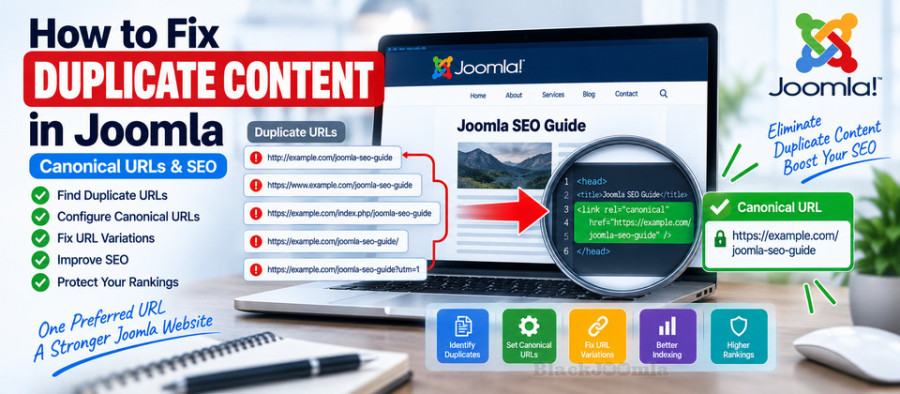
In this guide, you will learn how to find duplicate content in Joomla, understand why duplicate URLs occur, configure canonical URLs, control URL variations, and prevent common duplicate content problems.
If you are still working on your Joomla URL structure, first read our guide on how to configure SEF URLs in Joomla.
What Is Duplicate Content?
Duplicate content occurs when substantially similar or identical content is available through more than one URL.
For example, imagine that the same article can be reached through:
https://example.com/joomla-seo-guide

https://example.com/index.php/joomla-seo-guide

https://www.example.com/joomla-seo-guide

http://example.com/joomla-seo-guide
These URLs may represent the same underlying content even though their addresses are different.
Google groups duplicate or substantially similar pages together and selects a canonical URL to represent the group. The canonical URL is the version Google considers most representative of the content. :contentReference[oaicite:2]{index=2}
Is Duplicate Content a Google Penalty?
Usually, no.
Having some duplicate content does not automatically result in a Google penalty.
However, allowing the same content to exist under many URLs can create technical SEO problems.
It can:
- Make URL management more complicated.
- Make it harder to determine which URL should appear in search results.
- Split signals between multiple URL versions.
- Make analytics and reporting more difficult.
- Increase the number of URLs search engines need to crawl.
- Create unnecessary redirects and indexing signals.
Google recommends establishing clear canonicalization signals when multiple URLs represent substantially the same content. :contentReference[oaicite:3]{index=3}
Why Does Duplicate Content Happen in Joomla?
Joomla is a flexible CMS that dynamically builds URLs based on content, categories, menu items, aliases, routing configuration, and other factors.
This flexibility is useful, but it can also create multiple URL paths to the same content.
Common causes include:
- Multiple menu items pointing to the same article.
- Different URL structures after changing menu configuration.
- HTTP and HTTPS versions.
- www and non-www versions.
- URLs containing
index.php. - Trailing slash variations.
- Query parameters.
- Pagination.
- Print or alternative page versions.
- SEF extensions generating alternative routes.
- Third-party extensions creating additional URLs.
Joomla's current SEO documentation specifically discusses the problem of the same content being accessible through different URLs and provides controls for domain, index.php, and trailing-slash handling. :contentReference[oaicite:4]{index=4}
Common Duplicate URL Examples in Joomla
Consider a page such as:
https://example.com/about-us
Potential duplicate versions could include:
http://example.com/about-us

https://www.example.com/about-us

https://example.com/index.php/about-us

https://example.com/about-us/

https://example.com/about-us?source=menu
Not every variation will necessarily be indexed or treated as a duplicate by Google, but the goal of technical SEO is to establish a clear preferred URL structure.
How to Find Duplicate Content in Joomla
There is no single tool that identifies every possible duplicate URL on every Joomla website.
A useful audit combines several methods.
1. Check Google Search Console
Google Search Console can provide useful information about how Google selected canonical URLs and which URLs were considered duplicates.
Use the URL Inspection tool to inspect important pages and compare Google's selected canonical URL with your preferred canonical URL.
Google specifically recommends using URL Inspection when troubleshooting canonicalization issues. :contentReference[oaicite:5]{index=5}
2. Crawl Your Website
A technical SEO crawler can identify multiple URLs, redirects, duplicate titles, duplicate content, canonical tags, and other URL-level problems.
This is particularly useful on large Joomla websites where manually checking every article is impractical.
3. Check Your Joomla Menu Structure
Review menu items that point to the same articles.
Joomla's routing can be affected by menu structure, so multiple menu paths can sometimes produce different URLs for the same underlying content.
4. Check URL Variations Manually
Test important pages using variations such as:
- HTTP vs HTTPS.
- www vs non-www.
- With and without
index.php. - With and without trailing slash.
- Alternative menu paths.
The objective is not to make every possible URL disappear. The objective is to make the preferred version clear and avoid unnecessary duplicate URLs.
Choose One Preferred Domain
Your Joomla website should have one preferred domain and protocol.
For example:
https://example.com
rather than allowing several equivalent versions to compete:
http://example.com
http://www.example.com
https://www.example.com
https://example.com
Joomla's System - SEF plugin includes a Site Domain setting that can be used to specify the preferred domain when a site is accessible through more than one domain. :contentReference[oaicite:6]{index=6}
Use HTTPS Consistently
If your website uses HTTPS, the secure version should normally be the preferred version of the site.
For example:
https://example.com/article
should be the preferred URL rather than:
http://example.com/article
The HTTP version should normally redirect to HTTPS through your server or hosting configuration.
Do not create multiple competing redirect systems that attempt to enforce HTTPS simultaneously.
Control www and Non-www Versions
Decide whether your preferred hostname uses www or does not use it.
For example, choose one:
https://example.com
or:
https://www.example.com
Then redirect the alternative hostname to the preferred version.
Consistency is more important than which of the two formats you choose.
Control index.php in Joomla URLs
Joomla provides settings for handling index.php in SEF URLs.
Current Joomla documentation describes Strict handling of index.php as a setting that can remove index.php from URLs and redirect incoming URLs containing it to the preferred version when URL rewriting is enabled. :contentReference[oaicite:7]{index=7}
For example:
https://example.com/index.php/about-us
can be redirected to:
https://example.com/about-us
If you are configuring this on an existing website, test the behavior carefully before applying major URL changes.
Control Trailing Slash Variations
Another common URL variation is the trailing slash.
For example:
https://example.com/about-us

https://example.com/about-us/
Joomla provides a Trailing slash for URLs setting that can enforce a consistent format. Current Joomla documentation states that the selected format is enforced with redirects when applicable. :contentReference[oaicite:8]{index=8}
Choose one URL format and use it consistently throughout your site.
What Is a Canonical URL?
A canonical URL is the preferred URL that represents a piece of content when multiple URLs contain the same or substantially similar content.
A canonical link can be placed in the HTML <head> of a page:
<link rel="canonical" href="https://example.com/preferred-page" />
This tells search engines which URL you consider the preferred version.
However, canonicalization is not a command that Google must follow. Google describes canonical signals as hints and can select a different canonical URL when its systems determine that another version is more appropriate. :contentReference[oaicite:9]{index=9}
How to Add Canonical URLs in Joomla
The exact method depends on your Joomla version, template, extensions, and the type of content you manage.
For simple websites, you may be able to use Joomla's existing SEO functionality together with your template or SEO configuration.
For websites requiring detailed control over canonical URLs, a dedicated canonical extension can be useful.
Aimy Canonical PRO, for example, is designed specifically for canonical URL management and supports custom canonical paths, protocol and domain overrides, trailing-slash handling, and other canonicalization features. Its current JED listing shows compatibility with Joomla 3, 4, 5, and 6. :contentReference[oaicite:10]{index=10}
Canonical URL vs 301 Redirect
These techniques are related but they solve different problems.
| Method | Purpose | What Happens to the Visitor? |
|---|---|---|
| 301 Redirect | Permanently moves a URL | Visitor is sent to another URL |
| Canonical URL | Identifies the preferred version among similar URLs | Visitor normally remains on the requested URL |
For example, if an old article has permanently moved to a new URL, a 301 redirect may be appropriate.
If several URLs intentionally remain accessible but represent substantially the same content, canonicalization may be more appropriate.
Do Not Use Canonical Tags for Everything
A canonical tag is not a universal solution for every duplicate content problem.
If two URLs should no longer exist separately, a redirect may be the better solution.
If an internal link is wrong, fix the link.
If a page should not be indexed at all, consider the appropriate indexing control.
If two pages contain genuinely different and useful content, do not canonicalize one to the other merely because their topics are related.
Google's canonicalization guidance emphasizes that pages in a duplicate cluster should be sufficiently similar for canonicalization to make sense. :contentReference[oaicite:11]{index=11}
Duplicate Content Caused by Multiple Joomla Menu Items
Joomla menu structure can be an important source of URL variation.
An article can sometimes be accessible through more than one menu path.
For example:
/blog/joomla-seo-guide

/resources/joomla-seo-guide
If both URLs display essentially the same article, you should determine which URL should be the preferred version.
Then consider:
- Using one primary menu route.
- Removing unnecessary duplicate menu items.
- Using a canonical URL where appropriate.
- Redirecting obsolete URLs.
- Updating internal links to the preferred URL.
Joomla's own documentation uses multiple menu paths to demonstrate how the same article URL can change and why obsolete URLs may need redirects. :contentReference[oaicite:12]{index=12}
Duplicate Content from URL Parameters
URL parameters can create additional versions of a page.
For example:
https://example.com/product

https://example.com/product?source=facebook

https://example.com/product?campaign=spring
Depending on how your website handles parameters, these URLs may display the same main content.
Do not automatically assume that every parameter creates a serious SEO problem. First determine whether the parameter changes the actual content, creates a separate indexable URL, or is simply tracking information.
For important parameter variations, use appropriate canonicalization, redirects, internal linking, and indexing controls.
Duplicate Content from Pagination
Large Joomla websites may use pagination for category pages, blog layouts, products, or other content lists.
Pagination should not automatically be treated as duplicate content.
The important question is whether each paginated URL provides a useful and distinct page experience and whether the canonical setup accurately represents the site's intended URL structure.
If your website has complex pagination, test the generated canonical tags and URLs rather than applying a blanket canonical rule to every page.
Duplicate Content After a Joomla Migration
Migrations can create duplicate URLs when both the old and new URL structures remain accessible.
For example:
Old:
https://example.com/index.php/old-category/article

New:
https://example.com/new-category/article
After migration, determine which URL is the final preferred address.
Then:
- Map the old URL to the new URL.
- Create appropriate 301 redirects.
- Update internal links.
- Update the XML sitemap.
- Check canonical tags.
- Monitor 404 and indexing reports.
This is why URL planning should be part of a Joomla migration rather than something handled after the migration is finished.
Duplicate Content and XML Sitemaps
Your XML sitemap should contain the preferred URLs that you want search engines to discover.
It should generally not contain:
- Redirected URLs.
- 404 URLs.
- Duplicate URL variations.
- URLs that you intentionally exclude from indexing.
For more information, see our guide on how to create an XML sitemap in Joomla.
Duplicate Content and Internal Links
Internal links are an important but sometimes overlooked canonicalization signal.
If a website consistently links to:
https://example.com/joomla-seo-guide
but also generates navigation links to:
https://example.com/index.php/joomla-seo-guide
you have created unnecessary inconsistency.
Use your preferred URL format consistently throughout menus, modules, articles, breadcrumbs, and other internal navigation elements.
Should You Use Multiple Canonical Extensions?
Usually, no.
Installing multiple extensions that generate or modify canonical tags can create conflicting signals.
For example, one extension could output:
<link rel="canonical" href="https://example.com/page-a" />
while another outputs:
<link rel="canonical" href="https://example.com/page-b" />
This creates an unnecessary technical problem.
Choose one primary canonicalization system and verify its output.
Using 4SEO for Joomla Canonicalization
4SEO provides broader Joomla SEO functionality that includes page canonicalization, URL redirects, XML sitemaps, metadata management, and other technical SEO features.
This can be useful when you want to manage several related SEO functions from one system instead of installing separate extensions for every individual task.
The current JED listing confirms that 4SEO supports Joomla 3, 4, 5, and 6 and includes page canonicalization among its features. :contentReference[oaicite:13]{index=13}
How to Fix Duplicate Content in Joomla: Practical Workflow
If you suspect that your Joomla website has duplicate content, use this workflow:
- Identify the duplicated URLs.
- Determine whether the content is actually substantially similar.
- Choose the preferred URL.
- Check HTTP and HTTPS versions.
- Check www and non-www versions.
- Check
index.phpvariations. - Check trailing slash variations.
- Review Joomla menu items.
- Check URL parameters.
- Check canonical tags.
- Update internal links.
- Update your XML sitemap.
- Use 301 redirects for obsolete URLs.
- Use indexing controls where appropriate.
- Verify the result in Google Search Console.
How to Check Which Canonical URL Google Selected
One of the most useful tools for this task is the URL Inspection tool in Google Search Console.
Inspect the URL and compare:
- The URL you inspected.
- The canonical URL declared by your website.
- The canonical URL selected by Google.
These are not necessarily the same.
Google explicitly states that it may select a different canonical URL from the one specified by the website when its systems determine that another URL is a better representative. :contentReference[oaicite:14]{index=14}
What If Google Chooses the Wrong Canonical?
If Google selects a different canonical URL from your preferred URL, do not immediately add more canonical tags.
First check:
- Whether the pages are genuinely duplicate or substantially similar.
- Whether the canonical tag points to the correct URL.
- Whether the preferred URL returns HTTP 200.
- Whether the preferred URL is indexable.
- Whether internal links consistently point to the preferred URL.
- Whether your sitemap contains the preferred URL.
- Whether redirects point in the correct direction.
- Whether the site has conflicting HTTP, HTTPS, www, or trailing-slash versions.
Google recommends reviewing technical canonicalization signals and making sure pages grouped together as duplicates are sufficiently different when they are intended to be separate pages. :contentReference[oaicite:15]{index=15}
Joomla Duplicate Content Checklist
- Choose one preferred domain.
- Use HTTPS consistently.
- Configure SEF URLs correctly.
- Control
index.phpvariations. - Choose one trailing-slash format.
- Review multiple menu paths to the same content.
- Check duplicate URL parameters.
- Use canonical URLs where appropriate.
- Use 301 redirects for permanently obsolete URLs.
- Keep internal links consistent.
- Keep your XML sitemap clean.
- Avoid multiple extensions generating conflicting canonical tags.
- Check important URLs in Google Search Console.
Frequently Asked Questions
Is duplicate content bad for Joomla SEO?
Duplicate content is not automatically a Google penalty. However, having the same content available through many URLs can create crawling, indexing, reporting, and canonicalization problems.
What causes duplicate content in Joomla?
Common causes include multiple menu routes, HTTP and HTTPS versions, www and non-www versions, index.php variations, trailing slashes, URL parameters, pagination, and third-party extensions.
How do I fix duplicate URLs in Joomla?
First identify the preferred URL. Then use consistent internal links, appropriate Joomla SEF settings, canonical URLs, and 301 redirects for obsolete URLs.
Does Joomla automatically add canonical tags?
The exact canonical behavior depends on your Joomla version and configuration. Joomla provides several SEO and routing controls, but websites with more complex canonicalization requirements may need additional configuration or a dedicated SEO extension.
Should I use a canonical tag or a 301 redirect?
Use a 301 redirect when a URL has permanently moved and should no longer be used. Use canonicalization when multiple URLs remain accessible but one version should be treated as the preferred representative.
Can multiple Joomla menu items cause duplicate content?
Yes. Multiple menu routes can sometimes make the same article accessible through different URLs. Review your menu structure and determine which URL should be the primary version.
Should duplicate URLs be included in an XML sitemap?
Normally no. Your sitemap should contain the preferred URLs that you want search engines to discover rather than duplicate or redirected versions.
Can I install several canonical extensions?
It is generally better to use one primary canonicalization system. Multiple extensions generating conflicting canonical tags can create unnecessary technical SEO problems.
Final Thoughts
Duplicate content in Joomla is usually a URL management problem rather than a simple content problem.
The goal is not to eliminate every technically possible URL variation. The goal is to create a clear, consistent URL architecture and make the preferred version obvious to both users and search engines.
Start with Joomla's own SEF and routing controls, then use canonical URLs, redirects, internal linking, and sitemap management where necessary.
For larger Joomla websites, a dedicated SEO solution such as 4SEO or a specialized canonical tool such as Aimy Canonical PRO can provide more granular control.
When these signals all point to the same preferred URL, your Joomla website has a much cleaner technical SEO foundation.
For the next step, continue with our guide to the best Joomla SEO extensions.