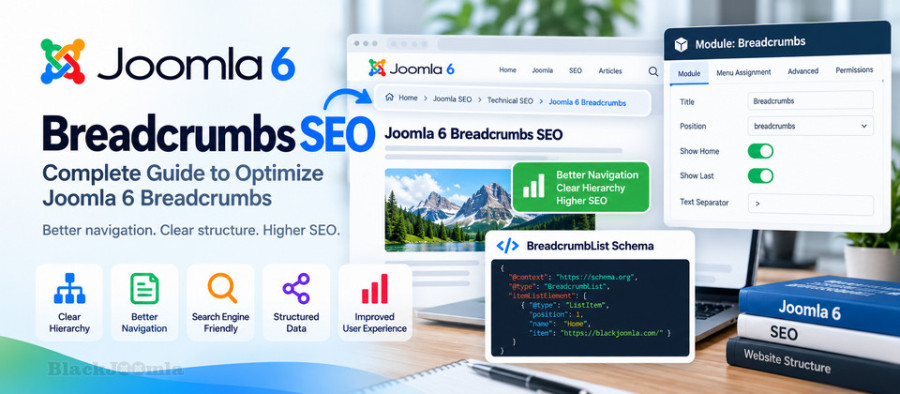
What Are Breadcrumbs in Joomla?
Breadcrumbs are a hierarchical navigation path that shows the user's current location within a website.
A typical Joomla breadcrumb structure might look like this:
Home > Joomla > SEO > Joomla Breadcrumbs SEO
Each level represents a part of the website structure and, when appropriate, can provide a link back to the corresponding section.
Joomla includes a built-in Breadcrumbs module that can display this navigation path on the frontend.
Why Are Breadcrumbs Important for Joomla SEO?
Breadcrumbs are primarily a navigation and website-structure feature, but they can also support your overall SEO architecture.
They can help:
- Visitors understand where they are on the website.
- Users navigate back to higher-level pages.
- Search engines understand relationships between pages.
- Important categories become easier to discover.
- Large websites maintain a clearer information architecture.
- Users understand the relationship between an article and its category.
Breadcrumbs should therefore be considered part of your overall site architecture rather than a standalone SEO trick.
How Joomla Breadcrumbs Work
Joomla uses a pathway system to build breadcrumb information, and the core Breadcrumbs module displays that information on the frontend.
In Joomla 3, the Breadcrumbs module can be managed from:
Extensions → Modules → Breadcrumbs
The module can then be published in an appropriate template position and assigned to the pages where you want it to appear.
The Joomla documentation describes the Breadcrumbs module as a navigation element that illustrates the user's location within the website and provides navigation back to higher-level pages.
How to Enable Breadcrumbs in Joomla
If your Joomla website does not currently display breadcrumbs, you can enable the core Breadcrumbs module.
Step 1: Open the Module Manager
Log in to the Joomla Administrator and open:
Extensions → Modules
Step 2: Find the Breadcrumbs Module
Look for the module named:
Breadcrumbs
The Joomla core module type is:
mod_breadcrumbs
Step 3: Publish the Module
Make sure the module is published and assigned to an appropriate template position.
Step 4: Configure the Menu Assignment
You can display the breadcrumbs on all pages or assign them only to selected menu items.
For an SEO-focused website, make sure important article and category pages are included in the assignment.
Step 5: Check the Frontend
Open several pages on your website and verify that the breadcrumb path accurately reflects the site's structure.
Joomla Breadcrumb Settings
The Joomla Breadcrumbs module provides several useful options.
Show Home
This option controls whether the Home page appears as the first breadcrumb item.
For example:
Home > Joomla SEO > Breadcrumbs
Show Last
This option controls whether the current page appears as the final breadcrumb item.
A complete path could therefore be:
Home > Joomla SEO > Breadcrumbs SEO
Text Separator
The separator visually separates individual breadcrumb levels.
Common examples include:
>
/
→
»
The exact visual appearance depends on the template and CSS.
Build a Logical Breadcrumb Structure
The most important SEO consideration is not the separator or visual design. It is the logic of the hierarchy.
For example, a Joomla SEO article could have a structure such as:
Home
> Joomla
> SEO
> Joomla Breadcrumbs SEO
This structure tells visitors that the current article belongs to the SEO section of the website.
Your breadcrumb structure should reflect the actual information architecture of your website.
Breadcrumbs and Joomla Categories
Categories can play an important role in creating a logical breadcrumb hierarchy.
For example:
Home
> Blog
> Joomla SEO
> Joomla Breadcrumbs SEO
Here, the category provides a meaningful intermediate level between the website homepage and the individual article.
A well-organized category structure can therefore make breadcrumbs more useful.
Breadcrumbs and Joomla Menu Items
Joomla menu structure can affect the way navigation paths are generated.
This is particularly important on websites where the same article can be reached through multiple menu paths.
Before changing your menu structure, check how the change affects:
- Article URLs
- Breadcrumbs
- Canonical URLs
- Internal links
- Category navigation
A change that looks harmless in the administrator panel can sometimes affect the public URL structure.
Breadcrumbs and SEF URLs
Breadcrumbs and SEF URLs serve different purposes, but they should work together.
SEF URLs create cleaner and more understandable URLs, while breadcrumbs provide a visible navigation hierarchy.
For example:
URL:
/joomla-seo/joomla-breadcrumbs-seo.html

Breadcrumb:
Home > Joomla SEO > Joomla Breadcrumbs SEO
The URL and breadcrumb structure should ideally communicate a consistent content hierarchy.
For more information about Joomla SEF URLs, read:
How to Configure SEF URLs in Joomla: Complete Guide
Breadcrumbs and Internal Linking
Breadcrumbs can complement your internal linking strategy.
They provide additional links from an article toward higher-level sections of the website.
For example:
Home
↓
Joomla SEO
↓
Breadcrumbs
↓
Current Article
This creates another navigation path between related levels of your website.
However, breadcrumbs should not replace contextual internal links inside your articles.
Contextual links are still useful when one article directly references another relevant resource.
Read our complete guide:
Joomla Internal Linking: Complete SEO Guide
Breadcrumbs in K2
If your Joomla website uses K2, breadcrumb implementation requires additional attention.
K2 Items may be displayed through different menu and category structures, so the breadcrumb path should be tested on the actual frontend pages.
Check several K2 Items and verify that the breadcrumb:
- Shows the correct parent section.
- Uses the correct category.
- Links to the intended destination.
- Does not create unnecessary duplicate levels.
- Does not display obsolete menu paths.
- Does not generate unexpected URLs.
This is particularly important on older Joomla 3 websites where K2, SEF extensions, menu structures, and templates may all influence URL generation.
Breadcrumbs and K2 Categories
If your K2 website has multiple category levels, use them consistently.
For example:
Home
> Blog
> Joomla
> SEO
> Joomla Breadcrumbs
However, do not create unnecessary category levels simply to make the breadcrumb longer.
The hierarchy should reflect the actual organization of your content.
BreadcrumbList Structured Data
Breadcrumbs can also be represented using structured data.
The relevant Schema.org vocabulary is:
BreadcrumbList
A simplified JSON-LD example looks like this:
<script type="application/ld+json">
{
  "@context": "https://schema.org",
  "@type": "BreadcrumbList",
  "itemListElement": [
    {
      "@type": "ListItem",
      "position": 1,
      "name": "Home",
      "item": "https://blackjoomla.com/"
    },
    {
      "@type": "ListItem",
      "position": 2,
      "name": "Joomla SEO",
      "item": "https://blackjoomla.com/joomla-seo/"
    },
    {
      "@type": "ListItem",
      "position": 3,
      "name": "Joomla Breadcrumbs SEO"
    }
  ]
}
</script>
The structured data should accurately represent the visible breadcrumb hierarchy on the page.
Do Not Create Duplicate Breadcrumb Schema
One important technical issue is generating the same structured data more than once.
If your Joomla template, SEO extension, Schema extension, or another plugin already generates BreadcrumbList markup, do not automatically add another implementation.
Multiple implementations can create duplicate or conflicting structured data.
Before adding custom BreadcrumbList markup, inspect the page source and determine whether structured data is already being generated.
For more information about structured data in Joomla, read:
How to Add Schema Markup to Joomla: Complete Guide
Breadcrumbs and Google Search
Search engines can use structured breadcrumb information to better understand the hierarchy of a page.
However, implementing BreadcrumbList structured data does not guarantee that Google will display breadcrumbs in a particular format in every search result.
The most important principle is to ensure that the breadcrumb hierarchy is accurate, consistent, and useful to visitors.
Breadcrumbs Are Not a Substitute for Site Architecture
A breadcrumb cannot fix a poorly organized website.
If your categories, menus, URLs, and content relationships are confusing, simply adding a breadcrumb module will not solve the underlying problem.
Instead, review the complete structure:
- Homepage
- Main categories
- Subcategories
- Menu items
- Articles
- K2 Items
- Internal links
- URLs
Breadcrumbs should then reflect this structure.
Breadcrumbs and XML Sitemaps
Breadcrumbs and XML sitemaps have different purposes.
A breadcrumb is a navigation element displayed on the page, while an XML sitemap provides search engines with a structured list of URLs.
One should not be considered a replacement for the other.
For more information, read:
How to Create an XML Sitemap in Joomla: Complete Guide
Breadcrumbs and Canonical URLs
Breadcrumbs do not replace canonical URLs.
If a Joomla page can be accessed through multiple URLs, the preferred URL should still be handled through appropriate canonicalization and URL configuration.
The breadcrumb should ideally point to the intended category or parent page, while the current page should have the appropriate canonical URL.
This is especially important on Joomla websites using K2 and complex menu structures.
Breadcrumbs and Duplicate Content
If multiple navigation paths lead to substantially similar content, investigate the underlying URL structure rather than trying to solve the problem through breadcrumbs alone.
Review:
- Menu aliases
- K2 Item URLs
- Category paths
- SEF configuration
- Canonical URLs
- Redirects
Breadcrumbs should be part of the solution to navigation clarity, not a workaround for duplicate URLs.
Breadcrumb Design Best Practices
A good breadcrumb should be easy to see without competing with the main page content.
Consider the following design principles:
- Keep the breadcrumb visually simple.
- Use readable text.
- Make links distinguishable from the current page.
- Use a consistent separator.
- Avoid unnecessarily long breadcrumb labels.
- Make sure the breadcrumb works on mobile devices.
- Do not hide important breadcrumb information behind difficult interactions.
Breadcrumbs on Mobile Devices
Long category structures can make breadcrumbs difficult to display on small screens.
Test your breadcrumb implementation on smartphones and tablets.
If your website has many hierarchy levels, consider how the breadcrumb can remain readable without creating horizontal overflow or interfering with the page layout.
Common Joomla Breadcrumb Problems
Breadcrumbs Do Not Appear
Check whether the Breadcrumbs module is published and whether it has been assigned to the current menu item.
Also check whether the selected template position actually exists and is visible on the frontend.
Breadcrumbs Show the Wrong Category
This can occur when menu and category structures do not correspond to the expected content hierarchy.
Review the item's category, menu assignment, and routing configuration.
Breadcrumbs Show Duplicate Levels
Review your category and menu hierarchy and check whether multiple components or extensions are contributing breadcrumb entries.
Breadcrumbs Are Missing on K2 Items
Check K2 routing, menu assignments, category configuration, and the template's handling of the Joomla pathway.
Breadcrumbs Generate the Wrong Links
Inspect the generated HTML and identify the exact URLs used by the breadcrumb links.
Then compare those URLs with your preferred SEF and canonical URL structure.
How to Audit Joomla Breadcrumbs
A practical breadcrumb audit can be completed with the following steps.
- Open an important article.
- Check whether breadcrumbs are visible.
- Verify the hierarchy from Home to the current page.
- Click every breadcrumb link.
- Check whether each destination is relevant.
- Check the current page URL.
- Check the canonical URL.
- Inspect BreadcrumbList structured data if present.
- Test the page on mobile.
- Repeat the process for K2 Items and category pages.
Joomla Breadcrumb SEO Checklist
- Enable the Joomla Breadcrumbs module where appropriate.
- Use a logical hierarchy.
- Keep breadcrumb labels descriptive.
- Make parent breadcrumb levels clickable when appropriate.
- Check breadcrumb links for 404 errors.
- Keep breadcrumbs consistent with your category structure.
- Test K2 Items separately if you use K2.
- Check the relationship between menus and breadcrumbs.
- Keep breadcrumb URLs consistent with your preferred SEF URLs.
- Check canonical URLs on important pages.
- Use BreadcrumbList structured data when appropriate.
- Avoid duplicate BreadcrumbList markup.
- Test breadcrumbs on mobile devices.
- Do not use breadcrumbs as a replacement for internal linking.
- Do not use breadcrumbs as a replacement for an XML sitemap.
Frequently Asked Questions
Are breadcrumbs important for Joomla SEO?
Breadcrumbs are primarily a navigation and site-structure feature. They can support SEO by making the relationship between pages and categories clearer, but they are not a standalone ranking solution.
Does Joomla have a built-in Breadcrumbs module?
Yes. Joomla includes a core Breadcrumbs module that can be published and assigned to website pages.
Should I use BreadcrumbList Schema on Joomla?
BreadcrumbList structured data can be useful when it accurately represents the visible breadcrumb hierarchy. Before adding it manually, check whether your template or an existing SEO or Schema extension already generates it.
Do breadcrumbs replace internal links?
No. Breadcrumbs provide hierarchical navigation, while contextual internal links connect related content throughout your website. Both can have a useful role.
Do breadcrumbs help Google understand website structure?
Clear breadcrumbs and accurate structured data can provide additional context about the hierarchy of a page. However, your overall site architecture, links, URLs, and content relationships remain important.
Are Joomla breadcrumbs useful for K2?
Yes. They can be particularly useful on K2 websites with multiple categories and content levels. However, K2 routing and menu configuration should be tested carefully to ensure that the breadcrumb hierarchy and URLs are correct.
Final Thoughts
Joomla breadcrumbs are more than a small navigation feature. When they accurately reflect your website architecture, they can improve usability and provide another clear connection between articles, categories, and higher-level sections.
For Joomla websites using K2, SEF extensions, custom templates, or multiple SEO extensions, it is especially important to inspect the actual frontend output rather than assuming that the breadcrumb structure is correct.
Keep the hierarchy logical, use stable URLs, avoid duplicate structured data, and make sure breadcrumbs work together with your internal linking, canonical URLs, and overall site architecture.