What Are Meta Tags?
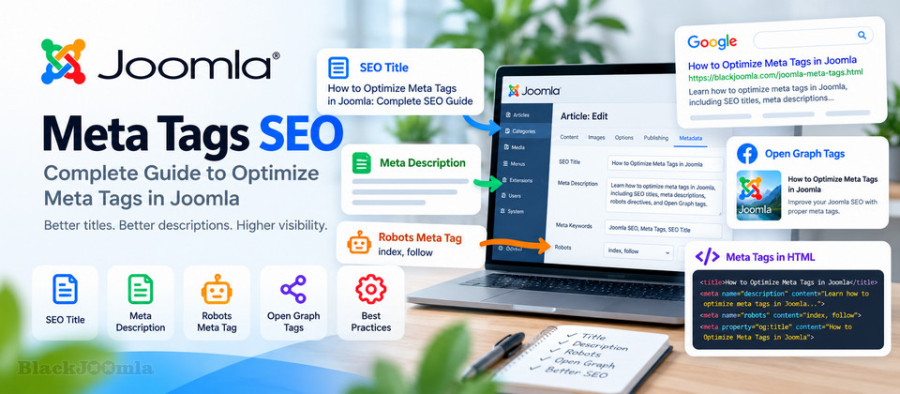
Meta tags are pieces of information placed in the HTML <head> section of a webpage. They provide information about the page without displaying that information as normal page content.
Some meta tags are useful for search engines, while others are primarily used by browsers, social networks, or other services.
For Joomla websites, the most important metadata elements to understand include:
- SEO title
- Meta description
- Robots directives
- Canonical URL
- Open Graph metadata
- Viewport information
- Language-related metadata
Why Meta Tags Matter for Joomla SEO
Meta tags help search engines understand important information about a page and can influence how that page is presented in search results.
For example, the title and meta description may be used to create the search result snippet that users see before visiting your website.
Good metadata can therefore help you:
- Clearly describe your page
- Improve search-result presentation
- Increase the relevance of search snippets
- Control crawling and indexing directives
- Improve social media sharing
- Create a more consistent SEO structure
SEO Title in Joomla
The SEO title is one of the most important elements of a webpage.
It tells users and search engines what the page is about and is commonly displayed as the main clickable title in search results.
A good SEO title should be:
- Relevant to the page content
- Clear and specific
- Easy to understand
- Written for users rather than search engines alone
- Different from titles used on other important pages
Example of a Good Joomla SEO Title
How to Optimize Meta Tags in Joomla: Complete SEO Guide
The title immediately tells the visitor what the article is about and includes the primary topic naturally.
How to Set the Page Title in Joomla
Joomla provides several places where page titles can be configured depending on how your website is structured.
For Joomla articles, the article title is normally the starting point. Menu items can also have settings that affect how page titles are displayed.
If you use extensions such as K2, the title and metadata may also be controlled from the K2 item configuration.
Always inspect the final HTML output of the public page to make sure the title generated by Joomla and your template is correct.
Meta Description in Joomla
The meta description provides a short summary of the page.
It is not simply a place to insert keywords. It should explain why the page is useful and encourage users to visit the page when it appears in search results.
Example
Learn how to optimize meta tags in Joomla, including SEO titles,
meta descriptions, robots directives, Open Graph tags, and best practices.
A useful meta description should accurately represent the actual content of the page.
How Long Should a Meta Description Be?
There is no permanent character limit that guarantees the description will always be displayed completely in Google.
Search engines can rewrite snippets depending on the search query and the content of the page.
Instead of focusing exclusively on a fixed character count, write a concise and useful description that accurately summarizes the page.
Should Every Joomla Page Have a Meta Description?
Important indexable pages should generally have a useful, unique meta description.
Do not copy the same description across dozens or hundreds of pages.
Each important page should have metadata that reflects its actual content.
Joomla Meta Keywords
Joomla also provides fields for meta keywords in some configurations and extensions.
However, meta keywords should not be confused with modern SEO keyword optimization.
Major search engines have historically reduced or eliminated the importance of the traditional meta keywords tag for ranking.
Therefore, you should not spend your SEO strategy trying to fill a meta keywords field with large lists of search terms.
Focus instead on:
- Useful content
- Search intent
- Page titles
- Meta descriptions
- Internal linking
- Structured data
- Technical SEO
Robots Meta Tag
The robots meta tag provides instructions to search engine crawlers about how a page should be handled.
A simplified example is:
<meta name="robots" content="index, follow">
This indicates that the page may be indexed and that links on the page may be followed.
Another example is:
<meta name="robots" content="noindex, follow">
This tells crawlers not to index the page while still allowing links to be followed.
When Should You Use Noindex?
noindex can be useful for pages that should remain accessible to visitors but should not normally appear in search results.
Examples can include certain administrative, utility, duplicate, or low-value pages depending on the structure of your website.
Do not use noindex on important pages that you actually want Google to index.
Meta Robots and Robots.txt Are Not the Same
A common Joomla SEO mistake is confusing the robots meta tag with the robots.txt file.
They perform different functions.
The robots meta tag is included in the HTML of a webpage and provides indexing-related directives.
The robots.txt file provides crawler access instructions at the website level.
For more information, see:
How to Configure Robots.txt in Joomla: Complete SEO Guide
Canonical URL and Meta Tags
The canonical link element is not technically a meta tag, but it belongs to the same broader group of HTML metadata used for SEO.
A canonical URL tells search engines which URL should normally be considered the preferred version of a page when multiple URLs contain substantially similar content.
A typical canonical element looks like this:
<link rel="canonical" href="https://blackjoomla.com/example-page.html">
Canonical URLs are particularly important on websites where the same content can be reached through multiple URLs.
For more information, see:
How to Fix Duplicate Content in Joomla: Canonical URLs & SEO
Open Graph Meta Tags
Open Graph metadata is primarily used to control how a page appears when it is shared on social platforms that support Open Graph information.
A basic example is:
<meta property="og:title" content="How to Optimize Meta Tags in Joomla">
<meta property="og:description" content="Complete Joomla meta tags SEO guide.">
<meta property="og:type" content="article">
<meta property="og:url" content="https://blackjoomla.com/joomla-meta-tags.html">
<meta property="og:image" content="https://blackjoomla.com/images/joomla-meta-tags.jpg">
These tags can help social platforms understand which title, description, URL, and image should be associated with a shared page.
Do Meta Tags Improve Google Rankings?
Not every metadata element is a direct ranking factor.
The value of metadata is broader than simply increasing rankings.
For example, a well-written title can help users understand a search result, while robots directives can control indexing behavior and canonical URLs can help search engines understand preferred URLs.
Therefore, metadata should be treated as part of a complete technical and on-page SEO strategy rather than as a shortcut to higher rankings.
Unique Meta Tags for Every Important Page
One of the most common problems on Joomla websites is using identical metadata across many pages.
For example, using the same meta description for every blog article does not accurately describe the individual pages.
Each important article should have metadata that reflects its own topic.
Bad Example
Joomla SEO extensions, Joomla templates, Joomla plugins and Joomla services.
Using the same description for every article provides little information about the specific page.
Better Example
Learn how to configure canonical URLs in Joomla and prevent duplicate content problems with practical SEO examples.
The second description clearly reflects the subject of the page.
Do Not Stuff Keywords Into Meta Tags
Adding a keyword repeatedly to a title or description does not make a page more relevant.
For example, avoid writing:
Joomla SEO | Joomla SEO Guide | Joomla SEO Tips | Joomla SEO Joomla
Instead, write a natural title that clearly communicates the topic.
How to Optimize Joomla Meta Tags: Complete SEO Guide
Meta Tags and Joomla Categories
Category pages can also appear in search results, depending on your website structure and indexing strategy.
If an important category is intended to receive organic search traffic, consider giving it a unique title and description rather than relying entirely on automatically generated metadata.
This is particularly important for websites with large numbers of categories.
Meta Tags for K2
If your Joomla website uses K2, pay attention to the metadata generated by K2 items and categories as well as the metadata generated by Joomla itself.
Check the final source code of an article to make sure that your intended:
- Title
- Meta description
- Robots directives
- Canonical URL
- Open Graph data
are actually present in the generated HTML.
This is especially important when multiple extensions, SEO components, templates, and plugins are active at the same time.
Avoid Multiple Extensions Controlling the Same Metadata
Running several SEO extensions that modify the same metadata can create conflicts.
For example, one extension may generate a canonical URL while another extension overrides it. A third extension may modify Open Graph information.
The result can be inconsistent metadata that is difficult to troubleshoot.
Choose a clear metadata architecture and identify which extension or Joomla component is responsible for each important SEO element.
How to Check Joomla Meta Tags
You do not need to guess whether your metadata is working correctly.
Open the public page in your browser and inspect the HTML source.
Look for:
<title>...</title>

<meta name="description" content="...">

<meta name="robots" content="...">

<link rel="canonical" href="/...">

<meta property="og:title" content="...">

<meta property="og:description" content="...">

<meta property="og:image" content="...">
This simple check can reveal many SEO configuration problems.
Common Joomla Meta Tag Problems
- Missing page titles
- Duplicate titles
- Duplicate meta descriptions
- Very short or meaningless descriptions
- Keyword-stuffed titles
- Accidental noindex directives
- Incorrect canonical URLs
- Multiple canonical tags
- Incorrect Open Graph information
- SEO extensions overriding Joomla metadata
- Template code generating unwanted metadata
Meta Tags and Website Speed
Metadata itself is usually very small compared with images, JavaScript, CSS, and other page resources.
However, a clean metadata structure is still important because technical SEO problems can affect how search engines crawl, understand, and index your website.
For overall Joomla performance optimization, see:
How to Improve Joomla Website Speed: Complete Performance Guide
Meta Tags and Structured Data
Meta tags and structured data are different technologies.
Meta tags provide metadata through HTML elements, while structured data provides machine-readable information about entities and content on a page.
Do not replace structured data with meta tags or assume that adding metadata automatically creates valid Schema markup.
For a detailed guide, see:
How to Add Schema Markup to Joomla: Complete Guide
Meta Tags and Internal Linking
Metadata cannot replace a well-structured internal linking system.
Your page title and description help describe the page, while internal links help users and search engines discover related content across your website.
For more information:
Joomla Internal Linking: Complete SEO Guide
Joomla Meta Tags SEO Checklist
- Write a unique and descriptive SEO title.
- Write a useful meta description for important pages.
- Avoid keyword stuffing.
- Use appropriate robots directives.
- Check the canonical URL.
- Use Open Graph metadata when social sharing is important.
- Check K2 metadata if your website uses K2.
- Avoid multiple extensions controlling the same metadata.
- Check the final HTML source instead of relying only on administrator settings.
- Keep metadata relevant to the actual page content.
- Review important pages regularly.
Frequently Asked Questions
What are the most important meta tags in Joomla?
The page title, meta description, and appropriate robots directives are among the most important metadata elements to understand. Canonical and Open Graph elements are also important parts of a modern technical SEO implementation.
Does Joomla automatically create meta descriptions?
Joomla can generate or inherit metadata depending on the configuration and the way the page is created. Important pages should be checked individually to ensure that the final metadata is appropriate.
Are Joomla meta keywords still important for SEO?
Traditional meta keywords should not be a major part of a modern SEO strategy. Focus on useful content, search intent, titles, descriptions, internal linking, structured data, and technical SEO.
Can multiple Joomla SEO extensions cause meta tag problems?
Yes. Multiple extensions can potentially modify the same metadata and create conflicts or duplicate elements. Always check the final HTML output of important pages.
Should every Joomla article have a unique meta description?
For important indexable articles, unique and relevant descriptions are generally preferable because they accurately describe the individual page.
How can I check Joomla meta tags?
Open the public page, inspect its HTML source, and look for the title, meta description, robots directives, canonical URL, and Open Graph elements.
Final Thoughts
Effective Joomla SEO is not about adding as many meta tags as possible. It is about providing accurate, useful, and technically consistent information about each important page.
Start with unique titles and useful descriptions, then verify robots directives, canonical URLs, and social metadata. If you use K2 and several SEO extensions, always inspect the final HTML output to make sure that only the intended metadata is being generated.
A clean metadata structure, combined with strong content, internal linking, technical SEO, and good website performance, provides a much stronger foundation for long-term Joomla SEO.